

Create new and manage existing users in ARTBUTLER. Change the user roles.
What’s a User in ARTBUTLER?
The access to ARTBUTLER is organised by users, or more precisely : user accounts, with an user name and password. An account can be used to log-in to ARTBUTLER but it is not possible to use the same account for multiple persons at the same time. So if you want to work together with two or more persons, e.g. with your manager or assistant, at the same time, everyone needs his own account. The ARTBUTLER licence limits the number of accounts you may create.
For each account you can assign roles that define the user rights for that user, for example, what sections of ARTBUTLER are visible and/or editable. If you assign more than one role, the role with the most extensive rights is decisive.
Creating a New User
User accounts are managed in Management > Users. Click the green plus to add a new user : a dialogue will pop up where you can fill in
- the user name and password for the log-in. Please re-type the password to make sure it is spelled correctly.
- the real name (optional, for the use in export documents)
- a comment (optional)
- assign at least one role for this account, usually Administrator to give full access to artbutler
Roles & Rights
 There are other pre-defined roles like User and Guest that limit the access rights for an account; Users may see and edit most of the content in ARTBUTLER but are restricted in changing settings and database maintenance, while Guests will see only selected parts of the database and may not edit anything. Please make sure that at least one account is an Adminstrator with full access to not lock you out completely.
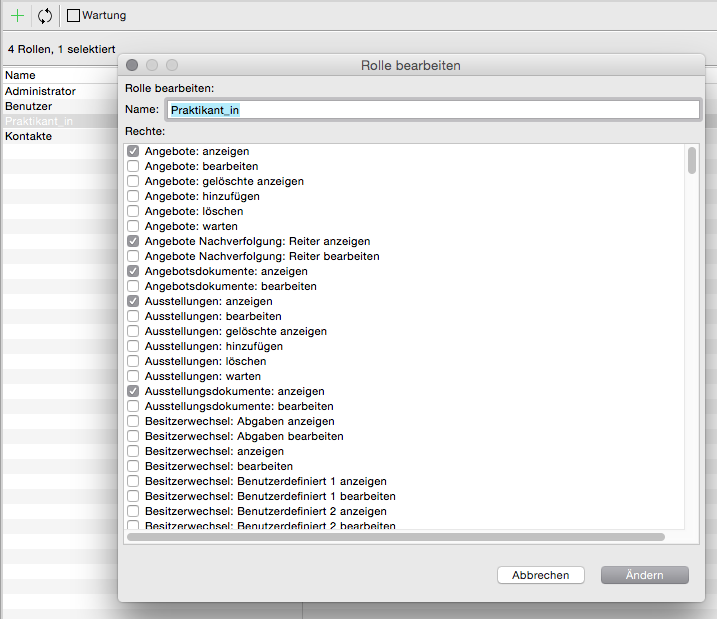
You can add or edit Roles in Management > Roles
For example, you could completely remove the owner change area for temporary employees. In the image example, a new role “Praktikant_in” (intern) was created, which usually only has the right to view content and not edit it.
ARTBUTLER won’t let you add a new user because you have already reached the limit of your license? Just contact us to get an offer for an upgrade of your ARTBUTLER license.
Changing User Name or Password
To edit an existing account just double-click it in the list of users and edit the values as required; you can change user name and password at any time.