

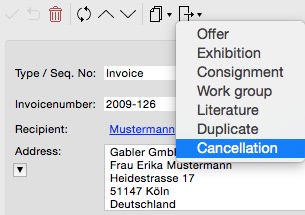
- Invoices can be cancelled in ARTBUTLER with just one click.
To cancel an invoice please select Cancellation from the Create from … menu. Any cancelled invoice is clearly marked with a red cancellation hint. - The initial invoice will be preserved and linked with a cancellation record.
When you cancel an invoice a copy of the initial invoice record will be created. A link between both records will established. Cancellation and invoice are read-only then, but you can of course set a new date and invoice no. for the cancellation. - When filtering your invoices you can easily exclude the cancelled ones from the result.
You can exclude cancelled invoices from searches, e.g. for sales reports: just add an additional search criteria for the invoices: Cancellaction Hint ID is empty. To find only the cancelled ones the criteria is Cancellaction Hint ID is not with an empty search field.