
Overview
The configurable work overview tab allows you to gather all relevant fields on the same tab so you’ll always see all important artwork information instantly.

How to configure the fields
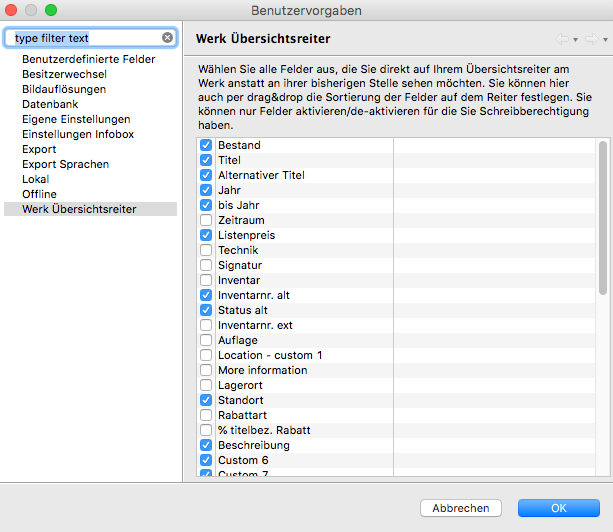
Go to Artbutler > Preferences > Work overview tab to specify which fields you’d prefer to see on your work overview tab rather than on your standard tabs. As is the case for export configurations and custom fields, your specifications will always apply to all users.
To move a field to the work overview tab, go to Preferences > Work overview tab and select a field from the list by ticking the relevant box. Use drag & drop to arrange the fields in your desired order. Fields that are closely linked, such as dimensions, can only be rearranged together.
Confirm with OK and restart Artbutler to view the work overview tab with the fields you selected.
Please note: If you haven’t selected any fields for your work overview tab, the tab won’t be displayed.
Access rights
As per usual, ARTBUTLER allows you to specify user rights for your work overview tab so you can determine who may configure, view, or change entries.
To assign individual user rights, go to Administration > Roles. The following authorisations are relevant here:
- Definition: Work Overview Tab Field Definitions: view / editDetermine who can configure the work overview tab. Select view if you only want a user to see and not change configurations. Select edit if you want a user to be able to make changes.
Please note: a user may only configure a field for which he or she has editing permission! - Work Overview: view / edit
Determine who can view or edit fields on the work overview tab. - Single Field Authorisation: view / edit
Each field also considers user rights for viewing or editing the original tab. For example: if I’m only authorised to view the Storage Location field on the Other tab (authorisation Works-Other: Storage Location) then I won’t be able to edit the work overview tab, even if I have the authorisation to edit Work-Overview. And vice versa: If I only have the authorisation to view Work-Overview and I want to make changes to the work overview tab, I can no longer edit the fields I’m otherwise authorised to edit.