This is done so that each individual edition within a run can have its own record: it can be consigned; exhibited; offered; invoiced; and shipped etc. independently and all this can be tracked and traced back to each piece within any given edition, just like any other unique artwork. Furthermore, particularly when dealing with large edition runs, the process of exporting editions, greatly reduces workload and time, as the edition is added to the system once and simply exported [copied].
Creating an Edition Run
To create multiple work records for the copies of an edition:
- Create the first record. You can view Adding a Work for more detail on this.
- Go to Works in your left hand side navigation. Select the New
 button at the top of your right hand side list view.
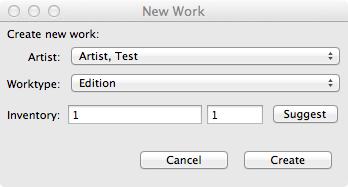
 - A pop-up window will appear for you to create the inventory number for the work. Select the artist and work type. Click Suggest for the next sequential inventory number and add a 1 in the second empty field before selecting Create.
- Go to Works in your left hand side navigation. Select the New