
Using bulk processing, you can change the list price and all associated values in multiple works at the same time.
This is how it works:
- Select the works in the worklist that you would like to edit.
- Click on the
 bulk menu above the list of works and select Data.
 - Choose “List Price” from the drop-down menu of data fields.
- Here you can either update all values (i.e. net price, VAT rate, gross price, currency and price comment) or, for example, just the VAT rate alone.
- Click on Change works – done.
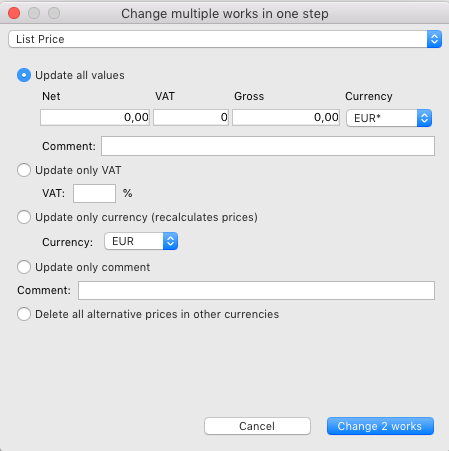
The following options are available:
- With Update all values you can adjust net price, value-added tax and gross price for the selected works exactly as in the work data record.
- Update only VAT sets the VAT to a new value, leaving the net price unchanged and recalculating the gross price.
- The option Update only currency converts the prices into the desired currency using the exchange rates from Management > Currencies. A tip: You can easily create price lists in other currencies without changing prices by using the rounding rules for prices in other currencies!
- Update only comment allows you to edit the price comment of the current price for all selected works.
- With the option Delete all alternative prices in other currencies you can delete explicitly given prices in foreign currencies in order to use the automatic rounding rules for the selected works. Fixed prices always overwrite the rounding rules and therefore must be removed before using automatic rounding.