
You may assign and optionally highlight categories for contacts and works. Search for categories in order to filter assigned records. You’ll receive a selection of relevant contacts (e.g. “press”) or works (e.g. “Subject to Export” or “Still Life”).
Contact Categories
Create Contact Categories
- Go to Administration, then to Contact Categories
- To create a category, click top right on

- Enter a title in the pop-up box
- Optionally assign a colour to the category
- Click Create
To edit contact categories, simply double-click the corresponding work category. Restart your computer to apply changes to contact records.
Changes to the contact data record are taken over after a reload .
.
Assign Contact Categories
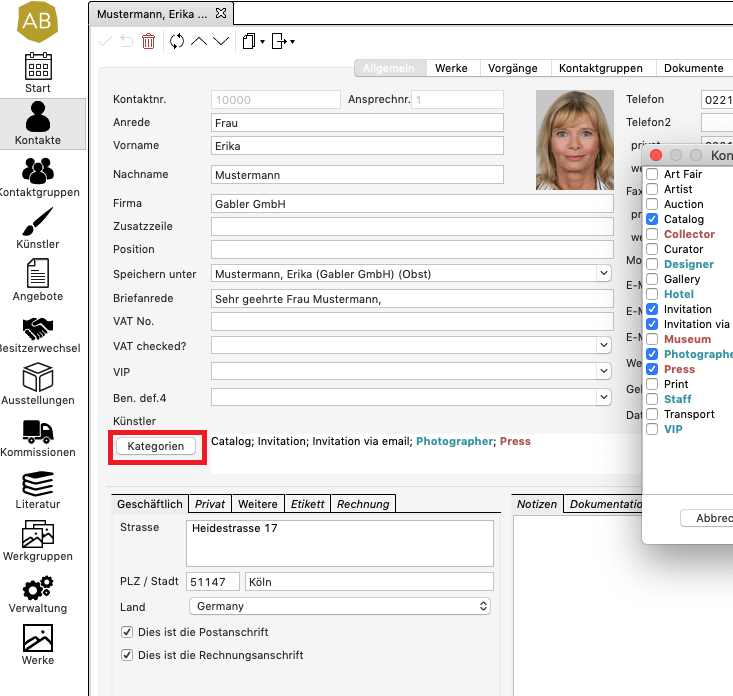
- Open a contact record to find the categories at the centre
- Right click on the button Categories
- Check the box for the desired category
- Click Apply
To remove a category from contact records, simply re-click and uncheck the category.
Search for Contact Categories
To view all contacts assigned to the selected category, search all contact lists using the quickfilter. Alternatively, you may create search filters with customised settings.
Delete Contact Categories
- Return to Management, then to Contact categories
- Click on the category you wish to delete
- To mark the category as deleted, click on the recycle bin icon top right

The category is now still visible in contact records, but can no longer be assigned. To entirely delete the category from ARTBUTLER PRO, select maintenance mode.
Work Categories
Every ARTBUTLER PRO Version from 2.16 onwards offers work categories.
Create Work Categories
- Go to Management, then go to Work categories
- To create a category, click top right on
- Enter a title in the pop-up box
- Optionally assign a colour to the category
- Click Create
To edit work categories, simply double-click the corresponding work category. Changes to the work data record are taken over after a reload .
Assign Work Categories
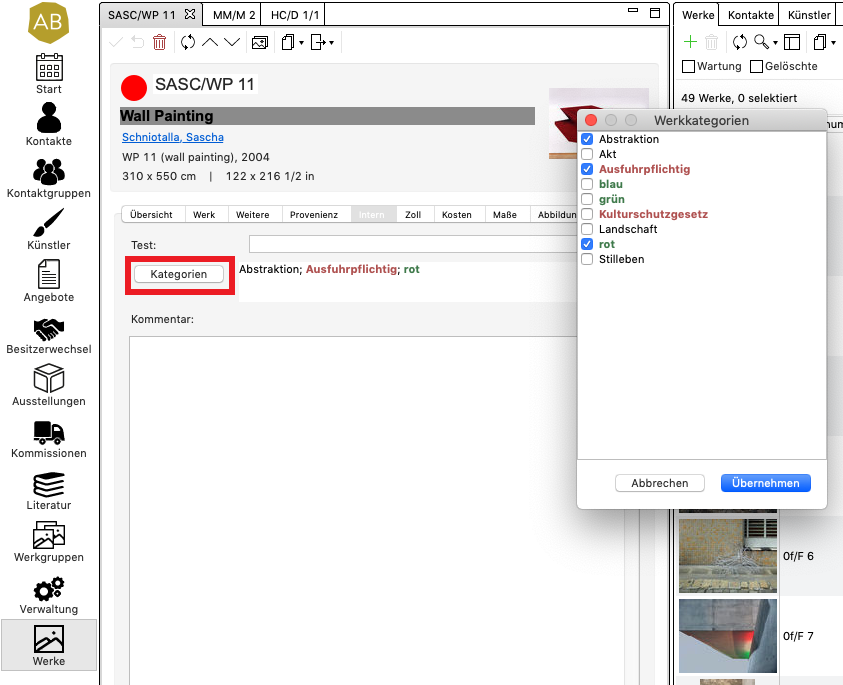
- Open the Internal tab in work records
- Click on the Categories button
- Check the box for the desired category
- Click Apply
To remove a category from work records, simply re-click and uncheck the category.
For better visibility, use the overview tab to place categories on the first tab of the work records.
Search for Work Categories
To view all works assigned to the selected category, search all work lists using the quickfilter. Alternatively, you may create search filters with customised settings.
Delete Work Categories
- Return to Management, then go to Work categories
- Click on the category you wish to delete
- To mark the category as deleted, click on the recycle bin icon top right
The category is now still visible in work records, but can no longer be assigned. To entirely delete the category from ARTBUTLER PRO, select maintenance mode.