
ARTBUTLER PRO enables compliance with current data protection regulations for the storage of personal data. This article will explain all the important functions it utilises for this purpose.
Documenting consents
Pursuant to Art. 7 GDPR, you as data controller must be able to prove consent to the processing of personal data. In the Contacts area, you can document your contacts’ consents using user-defined fields or in an extra comments field, depending on documentation requirements. For example, you can note in detail when you received a business card at a trade fair with the request to send information on a certain artist.
User-defined fields are fields without any specified use. You can give these fields their own title in order to use further data regarding e.g. works or contacts for your special requirements. All other users of your ARTBUTLER can also view these settings, allowing them to use the field for the intended purpose.
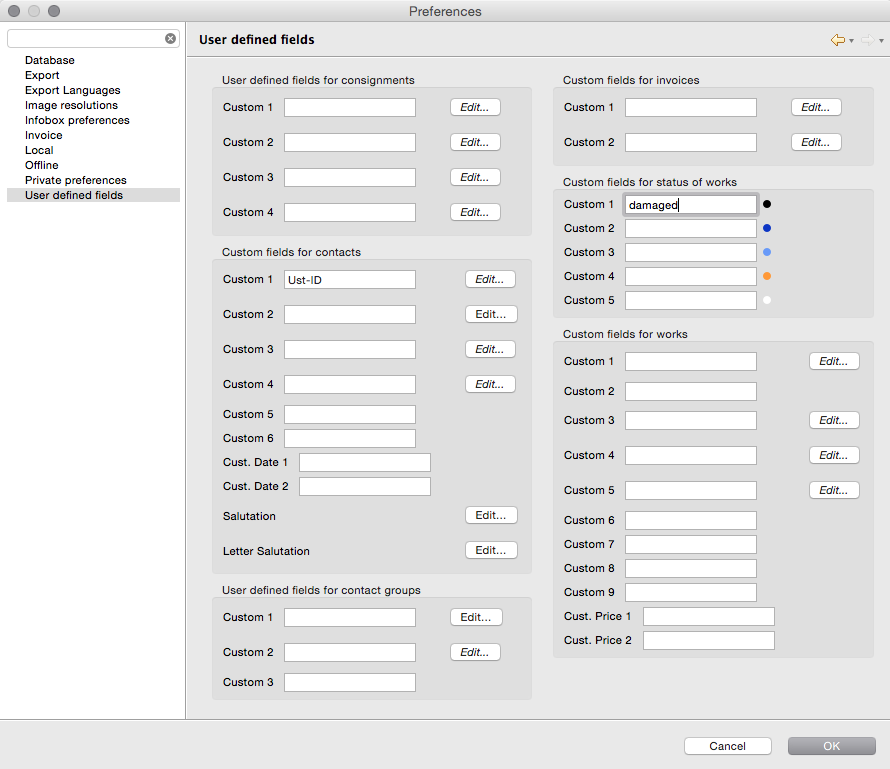
You can easily change the title of a user-defined field. Go to artbutler > Preferences > User-defined fields and enter the title you desire, e.g. Consent for information or Date of consent. You can find more information on editing user-defined fields here.
Inquiries on personal data
 The EU-GDPR reinforces citizens’ rights by allowing inquiries on personal data stored by you.
Using the template provided, you may export all relevant information stored on a contact in ARTBUTLER according to Art. 15 GDPR. The template for inquiries on personal data is available for download in our template pool.
Full control of your data
In the standard version, ARTBUTLER is provided as software that is installed locally on your server. This prevents unauthorised persons or third parties, for example cloud providers, from accessing your data. ARTBUTLER therefore corresponds to the so-called Privacy by Design regulation of the GDPR, according to which data protection can best be complied with if it is already integrated technically. Consequently, an automated data disclosure to third parties does not occur. In addition to this, ARTBUTLER is not coupled directly to newsletter tools to transfer consents and distribution lists automatically into ARTBUTLER, for instance. This data should remain in your newsletter tool so as to comply with data protection requirements.
We also provide access to your database independent of location – the ARTBUTLER Remote Hosting. Your database is saved for technical provision on one of our secure servers within Germany. We do not have any access to this data without your explicit consent and instruction and also safeguard this service for you with a contract for order processing. This gives you full control of your data.
Access rights/user roles protect sensitive customer data
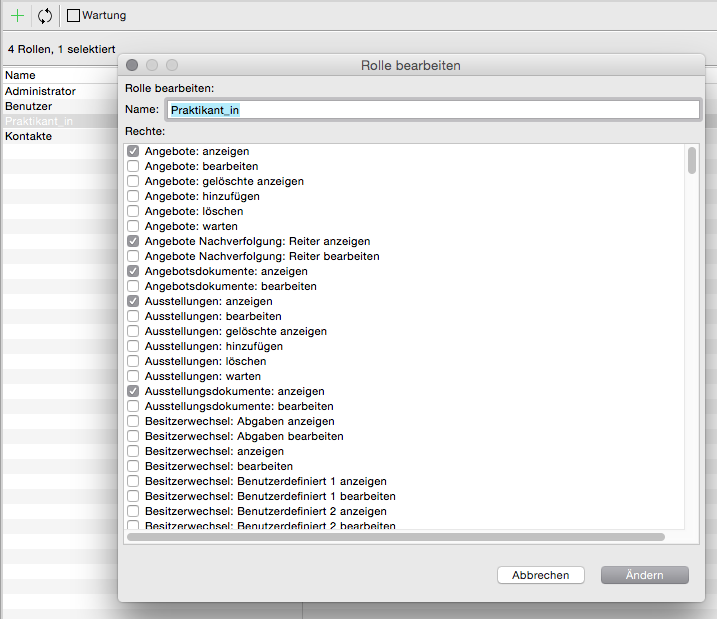 Access to ARTBUTLER is managed by user accounts. You can assign a role to each of these accounts, which defines the rights of the respective user. For instance, you can define which user can view and edit which areas in ARTBUTLER so as to restrict access to sensitive customer data.
We have already created four roles with different rights. You can edit all roles or create any number of totally new roles and assign rights to them.
Create your own roles corresponding to the work areas of staff. For instance, you could completely remove the Change of Ownership area for temporary staff. In the example shown, a new role “Trainee” has been created, which is usually only authorised to view and not edit content.
Processing erasure requests
Pursuant to Art. 17 GDPR, relevant persons are entitled to demand that data controllers delete relevant personal data. As a data controller, you are obliged to comply with this erasure request. The deletion period does not include data that you require
- for fulfilling a contract
- for fulfilling legal duties or public expenses
- for fiscal and commercial law retention and documentation obligations
- or for asserting, exercising or defending legal claims etc.
If you delete entries, e.g. contact data that you have saved in ARTBUTLER PRO, this will not be removed directly from the database but instead only marked as deleted. The entry will continue to exist but will no longer be displayed in the lists.
If you have the corresponding rights (usually as Administrator), you will have access to the “Maintenance” and “Deleted” functions. These options will be displayed above the relevant lists in the list view of ARTBUTLER.

This function  allows you to mark any entries as deleted in the list view. These entries are no longer displayed in ARTBUTLER after highlighting but are not deleted from the database. All links to this contact, as well as invoices and offers, are also retained. These should not be deleted either, as they are subject to fiscal and commercial law retention and documentation obligations.
Use this function  if you wish to delete an entry permanently from the database. Highlight the data records that you wish to delete permanently and then click on the “Delete permanently”.